What is Briefcase? (Demo video)
Last updated: June 9, 2026
Briefcase is the leading AI-native autopilot for bookkeeping and financial close.
Upload client documents via web upload, email or WhatsApp and Briefcase uses the latest AI capabilities to understand the context and help you move faster across your workflows.
We built Briefcase with intelligence at its core, and this means Briefcase learns from you. Every time you recategorise something, change a tracking code, or correct a VAT treatment, Briefcase remembers. So instead of writing and maintaining rules, you just work - and it gets noticeably smarter the more you do. Over time, you're building an increasingly powerful asset to help you scale faster.
Check out our full demo below:
Two ways to use Briefcase
Briefcase comes in two flavours, and you get the same powerful AI in both:
Briefcase Capture & Close - plugs straight into your existing Xero or QuickBooks ledger. Two-way sync ensures data is live and the AI Autopilot is always learning from the most recent activity, wherever the update happens.
Briefcase One - the same AI plus a full ledger of its own, built for MTD. Connect a bank feed, reconcile, and file straight to HMRC - one platform from receipt to submission.
Adding a client takes a few seconds: connect their Xero or QuickBooks ledger (or start fresh on Briefcase One), and Briefcase pulls in their history for context.
Bookkeeping in Briefcase
📄 Getting documents in
Briefcase has AI triage that detects document types, routes them to the correct inbox, removes duplicates, and filters out non-transactional emails automatically. There are three ways to submit, to fit with how you and your clients work:
📄 Web Upload— drag and drop files in
📄 Email Upload— forward documents as they arrive in your inbox
📄 WhatsApp Upload— snap a photo on the go
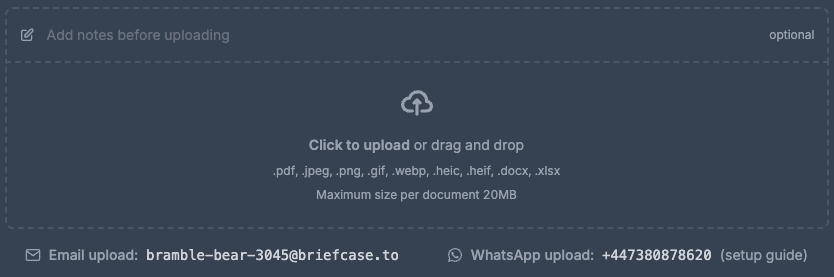
Contextual Upload: you can add written context - via email, WhatsApp, or in the platform - and Briefcase uses it. A note like "lunch with a client" tells Briefcase to apply the client-entertainment rules, so it knows the VAT isn't reclaimable. Your client gives Briefcase the context only they have, and the AI acts on it.
🤖 The AI Autopilot
Autopilot helps you move faster across a whole range of workflows by learning from you, and the business context. When you first start, documents come to you to review - and every time you approve or correct one, Briefcase learns the pattern. Once it's seen enough and is confident, it starts publishing the routine stuff on its own.
Before anything auto-publishes, the Autopilot runs three checks:
Legible — can it actually read the document?
Complete — did it extract every field?
Consistent — has it seen three or more similar transactions in the past

Pass all three and it posts straight to the ledger with no human touch - that means no supplier rules, no setup. The transactions publishing themselves are simply the ones you've already taught it.
And when something doesn't auto-publish, Briefcase tells you why, in plain English, and asks for your input. Review it once, and it'll learn for next time.
Extraction & VAT intelligence
Briefcase reads messy, real-world documents and gets the VAT right.
Line-item extraction: Take an invoice with multiple different items, all on one document. Briefcase reads each line and routes it to the right account - office equipment, cleaning, whatever it may be. You could never write a rule for that - and you don't have to.
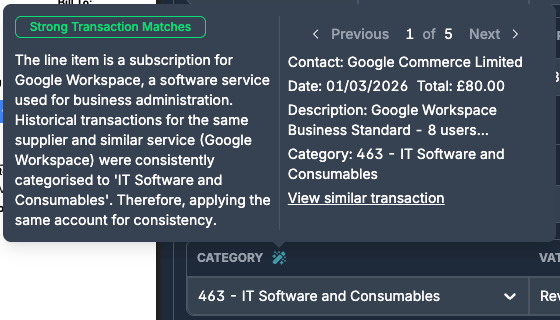
Transparent reasoning: Hover over any 🪄 to see the logic behind Briefcase's choice - its reasoning, in plain English, so everything is clear and auditable.
VAT compliance: Briefcase is trained weekly on HMRC's VAT legislation and verifies the supplier's VAT number directly with HMRC. You can hover over to click straight through to the specific legislation on HMRC's website.
Financial close
Financial Close features are currently only available in Briefcase Capture & Close, integrated with Xero or QuickBooks
This is where Briefcase goes beyond bookkeeping — the month-end close.
Prepayments: An annual software invoice comes in. Briefcase spots the prepayment — from the cover period and date range, or even a mention of an annual or quarterly subscription — and drafts the entire twelve-month journal schedule before anyone touches it. You review, hit publish, and the journals post automatically each month-end, reconciling back as they go.
Deferred income: The same, on the sales side. Invoice a client up front for a year and Briefcase recognises it, spreads it across the period, and releases it month by month — consolidating what's often managed in spreadsheets into one neat workflow.
Fixed assets: Detected right at the point of upload. Three fixed assets on a single invoice? Briefcase splits them into three separate assets, suggests useful life and depreciation, and posts to the register monthly. Suggestions are fully editable.
Accruals: Briefcase learns your recurring bills from historic transactions, and when one doesn't arrive, it proactively suggests the accrual — then reverses it automatically when the invoice finally lands.

Across all of this — prepayments, deferrals, assets, accruals — every adjustment links straight back to its source document, and a live tracker reconciles each one back to the ledger, down to the penny.
Working papers & closing the period
Financial Close features are currently only available in Briefcase Capture & Close, integrated with Xero or QuickBooks
Everything above feeds the last step: closing the period. Working papers walks the whole month-end close, start to finish, in one place.
Sense-check: Any invoices still waiting to be posted, any adjustments detected? Publish them right here.
Creditors & debtors review: Briefcase ages every supplier and customer balance and flags anything over three months, so you can add a quick note and resolve it.
Balance-sheet reconciliations: every balance-sheet account, listed with its balance. Because Briefcase has been running your prepayments, fixed assets and deferrals all along, those accounts are already reconciled against the ledger. For the rest — VAT, payroll, loans — build a quick schedule: add a line, enter the amount, attach the supporting file, and reconcile. Small differences can be reconciled and explained. Line items carry forward, so next month you just roll the support on.

When every account ticks green, you close the period — and Briefcase takes an immutable snapshot of the balance sheet, stored forever, with a full audit trail of who signed off and when. No more messy spreadsheets.
Briefcase One: the full ledger
Choose Briefcase One and you get the same powerful AI, all the bookkeeping functionality described above, plus a full ledger of its own, built for MTD.
🏦 Bank reconciliation + cash coding in one workflow: connect a bank feed via open banking (82+ UK institutions) or upload a bank statement, and every transaction lands in one place — categorised, matched and VAT-rated. Here, Autopilot runs a fourth check: a matching bank transaction. Pass all four and it's reconciled and posted automatically; cash-code a few yourself and it does the rest, getting smarter every time.
↔ Full double-entry ledger: live P&L, balance sheet, chart of accounts, and drill-down from any report line to the underlying entry.
📮 Direct HMRC submission: when the quarter closes, Briefcase One files your MTD submission straight to HMRC from the ledger.
🏪 Multi-business support: multiple sole trade, UK property, and foreign property lines under one client licence, each with separate P&L accounts.
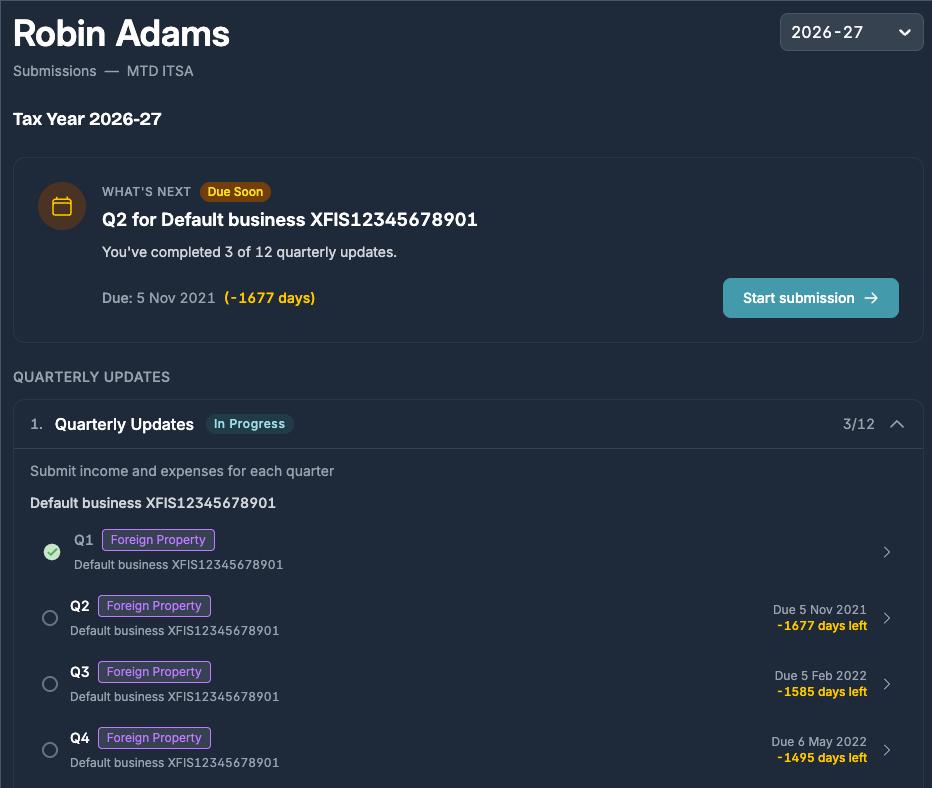
That's Briefcase One - a single platform, from receipt to submission.
Getting started
Sign up free today or book a demo here.
If you're an accountant or bookkeeper: 📄 How to get started with Briefcase as an accountant
If you're a business owner or employee:
How to get started with Briefcase as a client